

Liquidity & TVL Deals
Accessing the OTC Deal Page
- Navigate to the OTC section in Lucid.
- Locate the Liquidity or TVL deal you want to participate in.
- Click View to open the purchase page.
Understanding Liquidity Deals
Liquidity deals can integrate with Steer Protocol and are designed to settle token allocations in exchange for supported LP positions.
Participants:
- provide liquidity into the configured LP pool
- receive LP tokens
- deposit LP tokens into the OTC settlement contract
- receive discounted governance tokens vested over time
This infrastructure is designed to:
- deepen DEX liquidity
- improve market depth
- support actively managed LP infrastructure
- coordinate long-term liquidity growth
Preparing Assets
Before participating:
- ensure the required token pair is available
- ensure assets are on the correct chain
- prepare the required liquidity ratio
Most Liquidity deals require:
- a 50/50 token allocation
- assets on the destination chain
- compatible LP provisioning assets
If the required assets are unavailable:
- use Lucid’s Multi-Bridge infrastructure
- bridge assets to the correct chain
- swap into the required assets through a supported DEX
- alternatively transfer assets from a centralised exchange
Depositing Into Steer Protocol
Before settling the OTC deal, liquidity must first be deposited into the associated Steer Protocol pool.
Steer Protocol is Lucid’s integrated automated liquidity management infrastructure for LP coordination on Uniswap V3-based systems.
Steer manages LP positions through:
- active liquidity positioning
- automated rebalancing
- liquidity optimisation
- market-aware LP coordination
Creating the LP Position
- Select the required token pair.
- Enter the desired liquidity amounts.
- Review wallet balances and token ratios.
- If prompted, switch to the required chain.
- Deposit liquidity into the Steer pool.
- Receive LP tokens after successful deposit.
Settling the Deal
After receiving LP tokens:
- Select the LP token position.
- Enter the amount to deposit.
- Review:
- governance token payout
- discount percentage
- vesting duration
- vesting expiry date
- protocol fees
- Click the purchase action.
- Confirm the transaction in your wallet.
Once executed:
- LP positions are deposited into the OTC settlement contract
- governance tokens are allocated for vesting
- vesting begins according to the deal configuration
Pricing Information
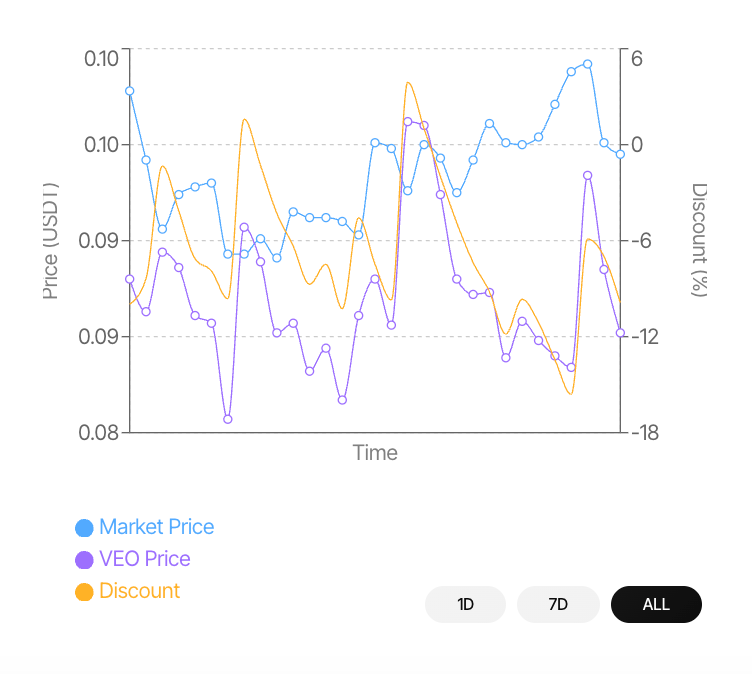
The purchase page displays:
- current deal pricing
- current discount
- governance token payout
- vesting duration
- protocol fee configuration
- market pricing comparison
The pricing chart compares:
- deal price
- market price
- discount behaviour over time
Supported chart timeframes include:
- 1D
- 7D
- All-time
Claiming Vested Tokens
Purchased governance tokens vest progressively according to the configured vesting schedule.
Users can:
- monitor vesting progress
- review claimable balances
- claim unlocked tokens
through the My Deals dashboard.
Additional claiming and token management flows are covered in the Claiming & Unwrapping Tokens section.